Watercolor Triangles Backgrounds
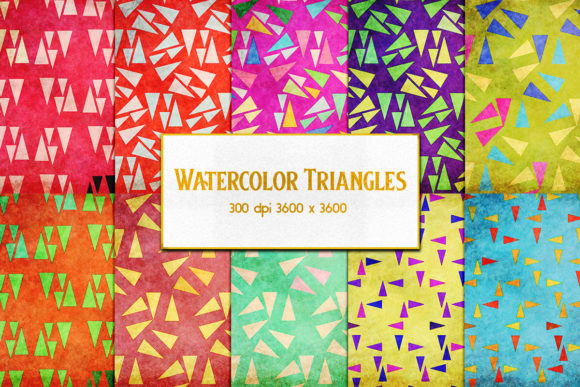
Watercolor Triangles Backgrounds are a set of 11 ready-to-use, high-resolution JPEG files designed for creators who want subtle texture, artistic flair, and professional polish—without the time or skill required to paint from scratch. Each background features soft watercolor washes shaped into gentle triangular forms, blending organic flow with modern geometry. They’re not clipart or generic patterns—they feel hand-painted, intentional, and quietly expressive.
Why These Backgrounds Stand Out
What makes these backgrounds especially useful is how they balance simplicity and sophistication. The triangles aren’t rigid or sharp-edged; instead, they melt into one another with translucent layers, soft edges, and natural pigment variation—just like real watercolor paper. That authenticity gives designs warmth and depth that flat colors or digital gradients often lack.
At 3600 pixels wide and 300 DPI, each file is print-ready for posters, business cards, presentation slides, or even large-format wall art. But they also scale beautifully on screens—whether you're designing an Instagram story, email header, or course landing page. You get flexibility without compromise.
Who Uses These—and Why
Freelancers building client proposals appreciate how a single Watercolor Triangles Background can elevate a plain PDF into something memorable. Educators use them behind lesson slides to keep students visually engaged without distraction. Bloggers layer them under text blocks to add quiet personality to minimalist layouts. Small business owners apply them to product packaging mockups or social media banners to reinforce brand warmth and creativity.
Even if you’ve never opened Photoshop, these JPEGs work instantly in Canva, PowerPoint, Google Slides, Adobe Express, or Apple Pages. Just drag, drop, and adjust opacity or size as needed. No masking, no blending modes, no trial-and-error—just clean, consistent results.
Real-World Uses You Can Try Today
- Branding kits: Use one background as your email signature backdrop or website hero section overlay (at 10–15% opacity) for instant visual cohesion.
- Digital planners & worksheets: Print them on premium paper for guided journals, habit trackers, or coaching workbooks—the texture feels tactile and inviting.
- Social media visuals: Pair a muted triangle background with bold sans-serif type for quote graphics that stand out in crowded feeds.
- Print-on-demand products: Apply them to notebook covers, greeting cards, or tote bag mockups—no licensing worries, since they’re royalty-free for commercial use.
- Educational handouts: Teachers insert them behind vocabulary lists or reflection prompts to make learning materials feel more thoughtful and less clinical.
What Makes the “11 Backgrounds” Set Practical
Having 11 distinct options means you’re not stuck choosing between “light blue” and “darker blue.” Instead, you’ll find variations in tone, contrast, saturation, and triangle density—some with airy spacing and pale washes, others with bolder overlapping shapes and deeper pigments. One might lean cool and misty; another warm and earthy. This range helps you match mood and message: calm for wellness content, energetic for creative workshops, grounded for sustainability brands.
Because they’re JPEGs—not layered PSDs or vector files—you don’t need advanced software to use them. But if you do use Photoshop or Affinity Photo, you’ll appreciate how cleanly they integrate: no fringing, no transparency glitches, no hidden layers to manage. They load fast, preview clearly, and print true-to-screen.
Things to Keep in Mind Before Using Them
While these backgrounds are versatile, a few practical notes help you get the best results:
- Text legibility matters. Avoid placing light-colored text directly over pale watercolor areas without adding a subtle semi-transparent overlay or shadow. A quick 80% black rectangle at 5–10% opacity behind your headline usually solves it.
- Respect the resolution. At 3600 px, they’re ideal for full-page prints up to ~12×12 inches at 300 DPI. For larger formats (like trade show banners), consider using them as texture overlays on bigger base images rather than stretching them beyond their native size.
- Color consistency varies across devices. Watercolor tones—especially soft greys, lavenders, and sage greens—can look slightly different on phone screens vs. desktop monitors vs. printed paper. If color accuracy is critical (e.g., for brand matching), test a small print first.
- They’re JPEGs—so no transparency. That means no automatic drop shadows or knockout effects unless you edit them further. But it also means universal compatibility: no surprises when sharing files with clients or collaborators using older software.
How They Fit Into Real Creative Workflows
For beginners, these backgrounds remove early friction—no need to learn brush settings or layer blending just to add visual interest. For professionals, they’re reliable “foundation elements”: dependable starting points that save hours of custom design time without sacrificing originality. A graphic designer might use one as a base for a client’s annual report cover, then add custom illustrations on top. A yoga instructor might drop one behind their weekly newsletter banner to reinforce themes of balance and flow.
Even educators building online courses find value—not because triangles “teach math,” but because the gentle, non-distracting rhythm supports focus. Students scanning a slide full of bullet points absorb information more easily when the background breathes with them, rather than competing for attention.
A Thoughtful Choice for Everyday Creativity
Watercolor Triangles Backgrounds aren’t about dramatic transformation. They’re about small, meaningful upgrades: the difference between a good-looking document and one that feels considered; between a generic template and something that quietly says, “I care about how this looks and feels.”
They suit people who value both beauty and efficiency—who want their work to reflect thoughtfulness, but don’t have unlimited time to achieve it. Whether you're launching a side hustle, preparing a classroom presentation, or designing your first portfolio site, these 11 backgrounds offer a simple, elegant way to begin.